Key concepts
AlphaAgent is an operating system for agents that mirrors how a high-performing team works: a specialist grounded on your doctrines and policies that run at scale privately in your AWS account. Studio is built in Aperture, the design language behind every AlphaAgent product: it controls how much of the agents' work reaches you and opens wider when you need to see more. Each section links to the page that documents the screen in full.
The whole system in one picture
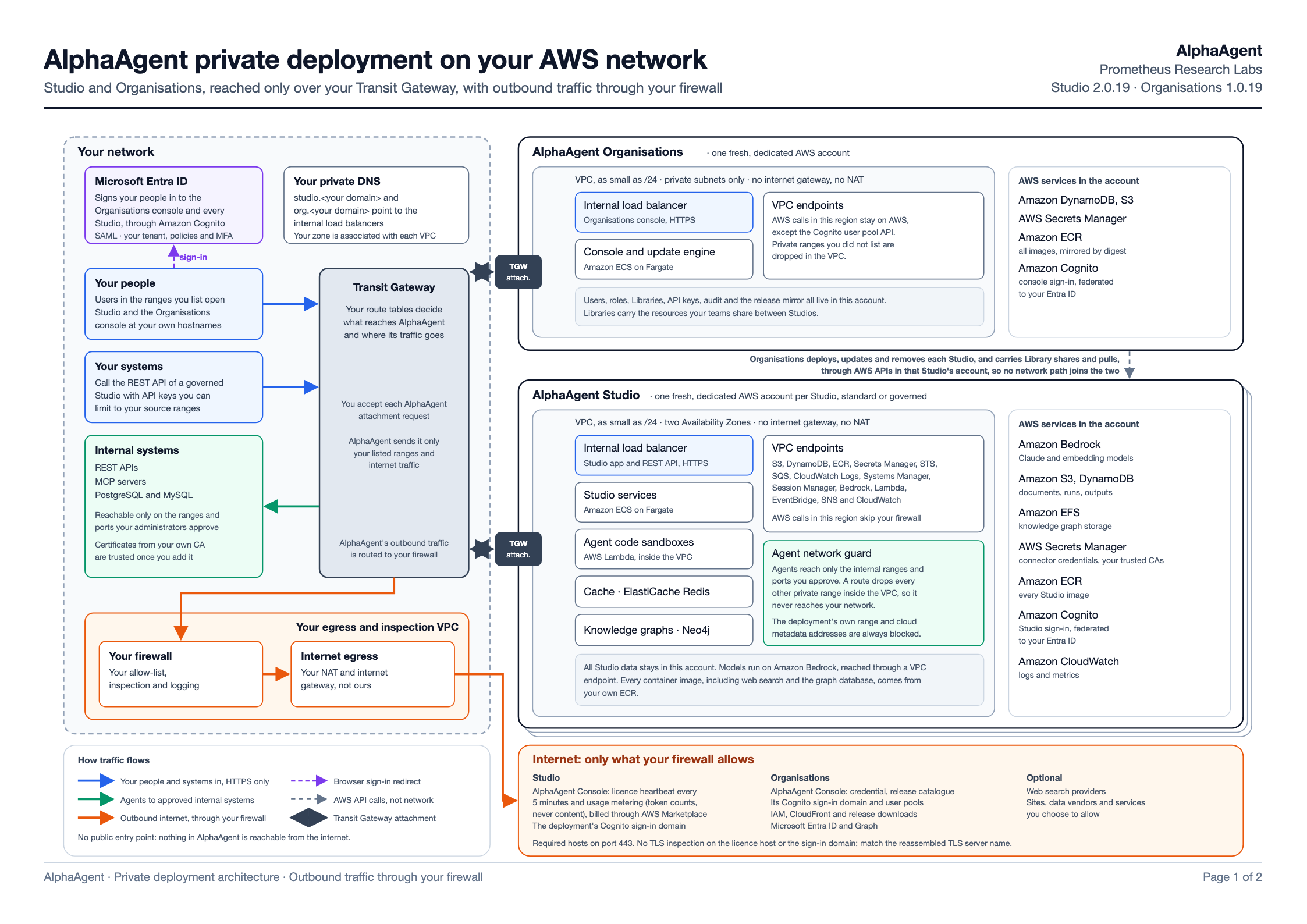
Select the picture to open the full-size PDF.
Your Organisations account deploys, updates and removes a Studio in each account you register, one fresh account per deployment, through AWS APIs rather than over the network. Your people reach the Organisations console and every Studio over your Transit Gateway, and your Entra ID tenant signs them in to both: a SAML enterprise application you create during the install for the Organisations console, and, once you connect your tenant, an application Organisations creates for each Studio. Each Studio sends a licence heartbeat every 5 minutes and usage metering (token counts, never content) to the AlphaAgent Console, which bills through AWS Marketplace. The Organisation Library carries resources between deployments, and your systems run Flows on a governed deployment through its REST API with an API key and its key external id.
The picture shows outbound internet traffic through your own firewall; the other design sends it through a NAT gateway in the AlphaAgent VPC. Each design is a two-page PDF with how traffic flows and what each side provides: outbound through your firewall and outbound through AlphaAgent's NAT gateway. Private network access explains the choice.
Specialists and agents
An agent is a specialist: named instructions grounded on your documents, data and systems, such as an "Equity Volatility Specialist" that computes realised volatility from your market data. Studio shows each agent as a Specialist or a Supervisor. Every change is a new version, created with Create new version: you keep the prompt as written or optimise it, then choose the agent's Intelligence Graph version, Data Bridge connections and Kernel on its Agent Map and activate the version. A specialist needs a Kernel before it can be activated. A fresh Studio has no agents. See Agents.
Studio Chat
Studio Chat is where you direct your agents and keep the conversation, evidence and results together. You choose an agent, set the objective and guide the work as it develops. The agent matches its effort to the question: it answers a simple question directly, gives bounded work a step or two, and shows you the plan of a deep analysis to approve before any step starts. It asks you when a step needs your approval. See Chat.
Lens
Lens is the inspection panel beside a conversation. It opens as wide as the view needs: Lens timeline lists the recorded activity, and Show narrows it to outputs, sources, approvals or the Governor's record. The same panel shows the Intelligence Graphs retrievals and Folio Files. A Flow run has its own Flow Timeline. See Follow a run.
Lens Map
Lens Map shows the steps of the work and the recorded activity under each one, so you can follow a result back to the step that produced it. Open it from Lens in a conversation. See Lens Map.
Lens Audit
Lens Audit brings a chat's or a Flow execution's recorded work into one place: the request and the response, outputs, approval history, exceptions and supporting evidence. When the history has loaded you can Download audit pack (ZIP), with a CSV index and the full JSON records. It shows what was recorded; it does not verify file contents or give a compliance verdict. See Lens Audit.
Folio
Folio holds one copy of every file you add and every output your agents and Flows produce, with where it came from: your workspace. Upload once and use any file anywhere: in a chat with @, in a Flow run as an input or a reference file, or in an Intelligence Graph build. In a conversation, Folio Files in Lens scopes them as "This conversation" or "My files"; on a Flow run, as "This run", "All runs of this Flow" or "My files". On a governed deployment you can also browse everyone's files; your own changes stay in your folders. See Folio.
Intelligence Graphs
An Intelligence Graph is built from a source PDF of up to 32 pages so agents can retrieve concepts and grounded evidence, for example a risk policy or a desk's research notes. Every build is a version: Ready, Building, Failed or Cancelled. An agent stays pinned to the version you chose until you move it. See Intelligence Graphs.
Data Bridge
Data Bridge holds the approved connections that give agents tools for external data and systems. Each connector has a connection type: SQL Database (PostgreSQL or MySQL), Snowflake, REST API, MCP Server or AWS. You test each connection and choose the tools agents may use; every save is an immutable version that agents pin. SQL connectors are read-only at run time. Credentials stay in your deployment's secret store. See Data Bridge.
Kernel
A Kernel is a sandboxed Linux environment where an agent runs Python and shell tools, on AWS Lambda in your account. Choose a prebuilt image or a custom one, set memory, timeout and workspace storage, and attach it through an agent's configuration. See Kernel.
Flows
A Flow turns repeatable work into steps: Task, Handoff, Conditional, Intelligence Graph update and Redact PII. Saving creates a version; activate one, then Run now or Run on schedule, for a daily risk pack or a month-end reconciliation. A step that needs a person parks the run until someone decides. Flow Runs in the Dock lists manual, scheduled and triggered runs. See Flows.
The Governor
The Governor is a separate model call that supervises each step of a run. Between tool calls it judges whether the agent is still on the step's objective and, if not, notes or steers. It never interrupts a tool call or ends a step; after three steers on one step it only comments. Read its record under Governor in Lens, or on a Flow run. See The Governor.
Inbox
The Inbox is one place for work that needs your decision, work that is running and work that has finished, across Studio Chat and Flows: a queue beside a review pane. Its Dock badge counts the decisions waiting for you. See Inbox.
Organisation Library
The Organisation Library is how deployments share. Each library holds one kind of resource, with Contributors (share and download) and Readers (download only). Share sends one version of a resource to a library; Download vN brings a first copy into your deployment and Update my copy to vN updates the copy you hold. A Flow can travel with its agents, connectors, Kernels and Intelligence Graphs. See Libraries and sharing.
Agent Store
The Agent Store lists agents published by Prometheus Research Labs. Download a copy to Agents; each copy arrives inactive for you to review and configure. See Agent Store.
Organisations
Your Organisation is your AlphaAgent Organisations install: one per company, in its own AWS account, at a hostname you choose. Its console holds the fleet of deployments, registered accounts, the identity provider, users and roles, the Organisation Library, API keys, configuration templates, update schedules and the audit log. See The console: layout and roles.
Deployment: standard or governed
A deployment is one Studio in one registered AWS account, created from the deployment wizard, where you choose once and for life between Standard (personal resources; sharing goes through the Organisation Library) and Governed (everyone assigned works on the same resources and files; only governed deployments offer programmatic access). Studio's Dock reads "Standard Deployment" or "Governed Deployment". See Deploy your first Studio and Working in a governed deployment.
Release, configuration template and update schedule
A release is a Studio version mirrored into your Organisation. A configuration template is a versioned set of deployment settings. Launching from a template copies its values once; an Update schedule that applies it keeps its deployments on every value it sets, its release included, on a schedule inside a maintenance window. See Where values come from and Configuration templates and Update schedules.
Identity and roles
Your Entra ID tenant is used twice: a SAML enterprise application you create during the install signs administrators into the Organisations console; an application the Organisation creates per Studio signs its users in, once your tenant is connected. Roles live in the Organisations console (Owner, Operator and Viewer tiers plus built-in roles per deployment or library); library membership (Contributor or Reader) is a separate grant; Studio has no roles. See Users, groups and roles and Identity and access.
The Console: licence, heartbeat and metering
The AlphaAgent Console is your account with Prometheus Research Labs: the private offer on AWS Marketplace, licence keys, usage and statements. A licence key authorises one Studio deployment: created in the Console, shown once, pasted into the deployment wizard. Studio then sends a heartbeat every 5 minutes. Metering receipts carry token counts and who caused them, never content, and are billed through AWS Marketplace. A billing hold shows a Billing needs attention banner; a block shows Service halted until the next good heartbeat. See Console: licences, usage and billing and Banners you may see.
PII redaction
PII redaction has a deployment-wide default: Off on a standard deployment, Mask on a governed one, changeable through a configuration template that an Update schedule applies, or Manage with a template. A Flow can tighten it but never loosen it (Off, Mask, Hash or Drop rows) with a Redact PII step, and the API serves a run's outputs only once redaction is complete. See PII redaction.
API key
An API key lets one of your systems run Flows on one governed deployment. An Organisations administrator mints it on the Programmatic Access page, bound to that deployment and the Flows it may use. Two credentials are shown once: the key (Authorization: Bearer <key>) and the key external id (the X-AlphaAgent-Key-External-Id header), the second factor. See API keys.
Related
- What is AlphaAgent: the four products and who uses which.
- A tour of Studio: where each of these lives in Studio.
- Glossary: every term on one page.
- Architecture overview: the same picture drawn for a security review.